
Have you ever wondered who can see what you’re doing online? Every time you visit a website, stream a video, or connect to public Wi-Fi, information travels between your device and the internet. While much of that information is already protected by encryption, certain details about your connection may still be visible to your internet provider or the network you’re using.
Table Of Content
- What Is a VPN?
- How Do VPNs Actually Work?
- 1. Your Device Connects to a VPN Server
- 2. The VPN Encrypts Your Internet Traffic
- 3. Your Data Travels Through a VPN Tunnel
- 4. The VPN Server Forwards Your Request
- 5. The Website Sends Information Back
- Why Might You Need a VPN?
- Protecting Your Connection on Public Wi-Fi
- Reducing Internet Provider Visibility
- Accessing Services While Traveling
- Connecting to Workplace Networks
- What Can a VPN Hide, and What Can’t It Hide?
- Free VPN vs. Paid VPN: Which One Is Better?
- Does Using a VPN Slow Down Your Internet?
- How to Choose a Reliable VPN
- Frequently Asked Questions About VPNs
- 1. Is it safe to use a VPN every day?
- 2. Can a VPN hide my browsing history?
- 3. Does a VPN protect against hackers?
- 4. Can websites detect VPN usage?
- 5. Is a VPN necessary on a smartphone?
- 6. Can I use a VPN to change my location?
- 7. Should I keep my VPN connected all the time?
- Conclusion
That’s where a Virtual Private Network, commonly called a VPN, comes in.
VPNs are often advertised as essential tools for online privacy and security. Some services even suggest that using a VPN makes you completely anonymous. But the reality is more complicated.
Understanding how VPNs work can help you decide whether you actually need one and what protection you can reasonably expect.
This guide explains VPN technology in simple terms, how it protects your connection, its practical benefits, and the limitations you should know before choosing a service.
What Is a VPN?
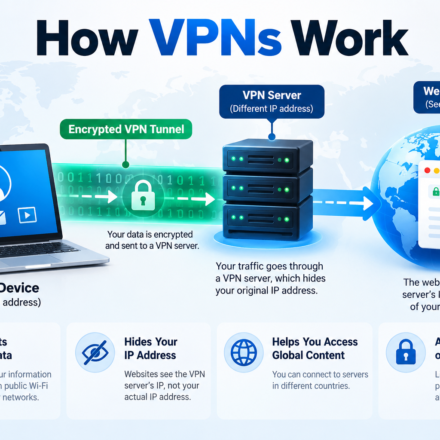
A VPN, or Virtual Private Network, is a technology that creates an encrypted connection between your device and a remote server.
Normally, when you open a website, your device communicates with that website through your internet service provider (ISP).
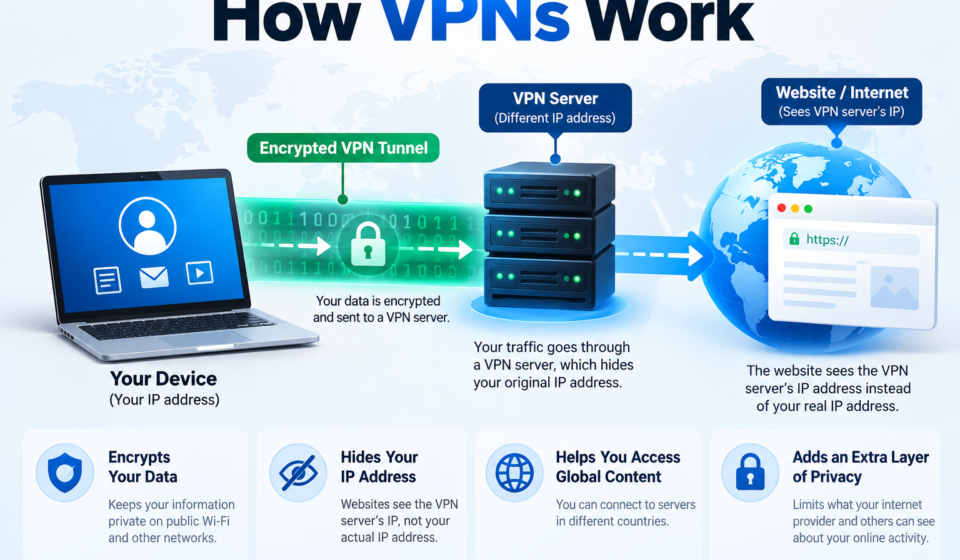
With a VPN enabled, your internet traffic first travels through a protected connection to a VPN server. The server then forwards your requests to the websites or services you’re trying to access.
As a result, websites generally see the VPN server’s IP address rather than your original public IP address.
Imagine sending a letter through a forwarding service. Instead of delivering it directly, you send it to an intermediary who forwards it to its destination.
A VPN follows a somewhat similar principle, except it also encrypts the information traveling between your device and the VPN server.
However, the VPN provider itself becomes an important part of your privacy equation.
How Do VPNs Actually Work?
Although VPN technology involves networking protocols and encryption, the basic process is relatively easy to understand.
1. Your Device Connects to a VPN Server
First, you install a VPN application on your computer, smartphone, or another supported device.
When you open the application, you can usually select a server location.
For example, someone browsing from Pakistan might connect to a VPN server located in Germany.
The VPN application establishes a protected connection with that server. Once connected, traffic configured to use the VPN travels through it.
2. The VPN Encrypts Your Internet Traffic
Encryption is one of the main features of a VPN.
Before your data leaves your device through the VPN connection, the software encrypts it using a secure protocol.
Encryption converts information into a form that cannot be easily understood without the proper cryptographic keys.
This means someone monitoring your local Wi-Fi network or internet connection generally cannot read the information traveling inside the encrypted VPN tunnel.
3. Your Data Travels Through a VPN Tunnel
The encrypted traffic travels across your internet connection to the VPN server.
This protected connection is commonly called a VPN tunnel.
Your ISP can usually identify that you’re communicating with a VPN server. However, when the VPN is configured correctly, it cannot directly see the destinations of the traffic carried inside the tunnel.
4. The VPN Server Forwards Your Request
When your traffic reaches the VPN server, it is processed and forwarded to the requested website.
The website generally sees the VPN server’s IP address instead of your home connection’s public IP address.
For example, if you connect through a German VPN server, a website may identify your connection as coming from Germany.
That doesn’t necessarily change your GPS location or prevent a website from identifying you through your account.
5. The Website Sends Information Back
The website responds to your request, and the data travels back through the VPN server to your device.
The VPN tunnel protects that return traffic between the server and your device.
This entire process occurs automatically as you browse websites, use applications, or access online services.
Why Might You Need a VPN?
A VPN can be useful in several situations, particularly when you want more control over how your internet connection handles your data.
Protecting Your Connection on Public Wi-Fi
Public Wi-Fi networks are convenient, but you don’t always know who manages them or how they’re configured.
Airports, hotels, cafes, and shopping centers often provide shared internet connections.
A VPN adds encryption between your device and the VPN server, limiting what someone monitoring the local network can observe.
Modern HTTPS websites already encrypt their connections, but a VPN can provide additional protection for traffic traveling through the network.
Reducing Internet Provider Visibility
Your internet service provider manages your connection and may be able to observe information about the destinations you access.
A VPN hides much of this destination information by routing traffic through its encrypted tunnel.
However, you’re shifting some trust from your ISP to your VPN provider. That’s why choosing a provider with clear privacy practices matters.
Accessing Services While Traveling
Some websites and online platforms offer different content depending on your geographic location.
A VPN can make your connection appear to originate from another country.
This can sometimes help travelers access services they normally use at home.
However, services may block VPN connections, and location restrictions can still apply. You should also respect local laws and the terms of the services you use.
Connecting to Workplace Networks
VPN technology is widely used by organizations to give employees protected access to internal systems.
For example, a remote employee may need access to company files, databases, or applications that aren’t publicly available.
A company-managed VPN can help establish a secure connection to those resources.
What Can a VPN Hide, and What Can’t It Hide?
One of the biggest misconceptions about VPNs is that they make every online activity private.
Here’s what they can and cannot do.
| Online activity or information | Does a VPN protect it? |
|---|---|
| Your original public IP address | Usually hides it from websites |
| Traffic on public Wi-Fi | Encrypts traffic in the VPN tunnel |
| Browsing destinations from your ISP | Generally hides tunneled destinations |
| Websites you log in to | Doesn’t hide your identity from those websites |
| Cookies and browser tracking | Doesn’t automatically stop them |
| GPS location | Doesn’t normally change it |
| Viruses and phishing attacks | Doesn’t reliably prevent them |
| Online anonymity | Doesn’t guarantee it |
Even with a VPN enabled, websites can identify you through account logins, browser cookies, device information, and other tracking methods.
A VPN improves specific parts of your online privacy. It doesn’t make you invisible.
Free VPN vs. Paid VPN: Which One Is Better?
Not all VPN services offer the same features, performance, or privacy protections.
Free VPNs may be suitable for occasional use, but some have restrictions on bandwidth, speed, and server locations.
Paid VPNs often provide more server choices and additional features. However, paying for a VPN doesn’t automatically make it trustworthy.
| Feature | Free VPN | Paid VPN |
|---|---|---|
| Subscription cost | Free | Monthly or yearly |
| Server locations | Often limited | Usually more choices |
| Data allowance | Sometimes limited | Often unlimited |
| Speed | May be restricted | Often fewer restrictions |
| Privacy protection | Depends on provider | Depends on provider |
| Customer support | Usually basic | Often more extensive |
Before choosing a VPN, read its privacy policy and check whether independent security audits support its claims.
The Federal Trade Commission recommends researching VPN applications carefully because some may collect user information or share it with third parties.
Federal Trade Commission
Does Using a VPN Slow Down Your Internet?
A VPN can affect your internet speed because your traffic takes an additional route through a remote server.
The impact depends on several factors:
- Server distance: A nearby VPN server usually provides lower latency than a distant one.
- Server congestion: Busy servers may respond more slowly.
- VPN protocol: Different protocols have different performance characteristics.
- Internet connection: Your existing internet speed still matters.
- Encryption processing: Protecting data requires some additional processing.
For normal browsing, you might not notice much difference. Online gaming, large downloads, and video calls can be more sensitive to increased latency or reduced speed.
Choosing a nearby server and a modern VPN protocol can often improve performance.
How to Choose a Reliable VPN
If you’re considering a VPN, focus on security and trust rather than advertising claims.
Look for a provider that offers strong encryption, modern protocols such as WireGuard or OpenVPN, and clear information about how it handles customer data.
Other useful features include a kill switch, which can block internet traffic when the VPN connection unexpectedly drops, and DNS leak protection, which helps prevent certain requests from bypassing the tunnel.
Check independent reviews, security assessments, the provider’s ownership, and its privacy policy.
A service that promises total anonymity or guaranteed protection against every online threat should be treated with caution.
Frequently Asked Questions About VPNs
1. Is it safe to use a VPN every day?
Generally, yes. A reputable VPN can be used daily for browsing, work, and other online activities. However, some applications and websites may restrict VPN connections.
2. Can a VPN hide my browsing history?
A VPN can hide browsing destinations carried through its tunnel from your internet provider. However, it doesn’t erase your browser history or prevent websites you’re logged into from recording your activity.
3. Does a VPN protect against hackers?
A VPN helps protect data traveling between your device and its server. However, it cannot stop every cyberattack, malicious download, phishing attempt, or stolen-password incident.
4. Can websites detect VPN usage?
Yes. Some websites recognize IP addresses associated with VPN services. They may request additional verification or restrict certain features.
5. Is a VPN necessary on a smartphone?
Not always. A VPN can provide additional privacy when using unfamiliar networks or traveling. Keeping your phone updated and avoiding suspicious applications are equally important.
6. Can I use a VPN to change my location?
A VPN can change the apparent location associated with your public IP address. It doesn’t automatically change GPS information or location data shared by applications.
7. Should I keep my VPN connected all the time?
You can, but it depends on your needs. Keeping a VPN enabled can provide consistent connection privacy, although it may affect internet speed or compatibility with certain services.
Conclusion
Understanding how VPNs work helps you separate their real benefits from exaggerated marketing claims.
A VPN creates an encrypted connection between your device and a remote server. This can protect traffic on unfamiliar networks, reduce the browsing information visible to your internet provider, and hide your original public IP address from websites.